
Artificial intelligence tools are becoming more useful for everyday work, software development, business operations, and creative projects. In October 2026, several major technology companies announced developments that could change how people access AI models, edit documents, automate meetings, and build software.
The latest AI tool updates include OpenAI bringing its models and Codex workflows to Google Cloud, Adobe expanding its creative tools across AI platforms, Zoom introducing new AI-powered workplace capabilities, and OpenAI rolling out GPT-6.1 models in ChatGPT Work and Codex.
These developments highlight an important trend: AI tools are moving beyond simple question-and-answer chatbots toward connected workflows that can help users complete more complex tasks.
In this article, we explore five important AI tool developments, explain what they mean for users, and discuss how businesses, developers, content creators, and everyday professionals can benefit.
Top 5 AI Tool Updates in October 2026
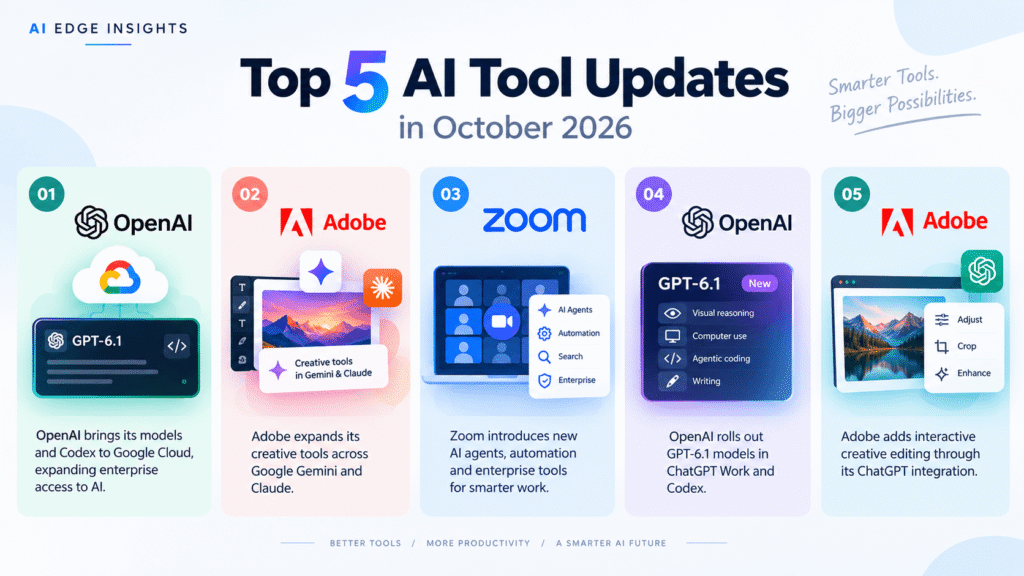
Here are the five developments covered in this roundup:
- OpenAI models and Codex are coming to Google Cloud.
- Adobe brings creative tools to Google Gemini and expands its Claude integration.
- Zoom introduces new AI agents, workplace automation, and enterprise tools.
- OpenAI begins rolling out GPT-6.1 models in ChatGPT Work and Codex.
- Adobe introduces interactive creative editing through its ChatGPT integration.
Each update focuses on a different part of the growing AI ecosystem, from enterprise infrastructure to creative productivity.
1. OpenAI Models and Codex Are Coming to Google Cloud
One of the most notable AI industry developments in October is the partnership between OpenAI and Google Cloud.
Announced on October 21, 2026, the partnership will bring OpenAI’s frontier models and Codex agentic workflows to Google Cloud’s Model Garden. This gives eligible enterprise customers another way to access OpenAI technology within their existing cloud environments.
According to OpenAI’s official announcement, the integration is designed to help organizations build AI-powered applications, modernize software development, and deploy complex workflows.
What Is Changing?
Google Cloud customers will be able to discover and purchase eligible OpenAI models through Google Cloud Marketplace.
The integration is also intended to make OpenAI models available through Google Antigravity and Gemini Agent, giving enterprise users additional flexibility when choosing AI models for different tasks.
Another important element is enterprise governance. Organizations can use Google’s existing cloud infrastructure, access controls, and data-governance capabilities when deploying supported workflows.
How Can Businesses Benefit?
This development could be especially useful for organizations already using Google Cloud.
For example, a software company might use an AI coding agent to investigate bugs, suggest code changes, or help developers work through complex programming tasks. A business could also build AI agents that connect information from approved internal systems.
Access through an existing cloud environment may simplify procurement and deployment for some organizations. However, availability, permissions, pricing, and supported models should be checked before implementation.
What Does This Mean for AI Users?
The partnership demonstrates that AI companies are increasingly distributing their technology through multiple cloud platforms rather than relying on a single access channel.
It also gives businesses more flexibility when evaluating competing models. Companies can select tools according to their technical requirements, governance policies, and budgets.
For individual ChatGPT users, however, the announcement does not automatically mean they can switch between OpenAI and Google models inside the standard ChatGPT interface.
Read more: OpenAI’s official Google Cloud announcement
For readers interested in the model behind OpenAI’s latest developments, explore our related coverage: OpenAI launches GPT-6 Astra: The most advanced AI model yet.

2. Adobe Expands AI Tools Across Google Gemini and Claude
Adobe is also expanding how people use its creative and document-editing tools through AI assistants.
On September 24, 2026, Adobe announced the arrival of Adobe in Gemini and an expanded Adobe integration for Claude. These developments are relevant to designers, marketers, content creators, and professionals who regularly work with PDFs and visual assets.
According to Adobe’s official announcement, the integrations bring creative capabilities into AI-assisted workflows.
What Can Users Do?
The announcement introduces two important directions for Adobe’s AI strategy.
Adobe in Google Gemini: Users can access supported Adobe creative capabilities through Gemini, helping connect conversational assistance with visual editing tasks.
Adobe tools in Claude: Adobe is expanding its Claude integration with Acrobat tools and additional ways to work with PDFs and Adobe Express designs.
The precise capabilities depend on the integration, product, and availability in a user’s account. Users should consult Adobe’s documentation for current feature support and regional access.
Why Is This Important for Designers?
Traditionally, users have moved between separate applications to brainstorm ideas, edit documents, adjust designs, and prepare content for publication.
AI integrations can reduce some of that switching by bringing supported creative actions into a conversational workflow.
For example, a marketing professional might use an AI assistant to develop campaign copy, work with a PDF, and prepare visual content for a social media campaign. A designer could use conversational instructions to explore creative changes before refining the final result in the appropriate Adobe application.
These integrations do not eliminate the need for professional design judgment. Typography, spacing, accessibility, brand consistency, and image quality still require careful review.
What About Small Businesses and Content Creators?
Smaller teams may benefit from using familiar AI assistants alongside established creative software instead of managing every task in a separate application.
However, users should check whether a particular integration requires an Adobe subscription, a compatible AI account, or additional permissions.
They should also review the terms governing uploaded files, confidential information, and commercial use.
Read more: Adobe’s official Gemini and Claude announcement
For AI Edge Insights readers, this is an important development in the broader movement toward AI-powered creative workflows.
3. Zoom Introduces New AI Agents and Workplace Automation Tools
Zoom is expanding its AI capabilities beyond meeting summaries and basic conversational assistance.
Its October 2026 Zoomtopia announcements focus on connecting business information, enabling AI agents, automating workflows, and strengthening enterprise governance.
The developments are designed to help organizations turn information from meetings, calls, chats, documents, and connected applications into useful actions.
According to Zoom’s official developer-platform announcement, the company is expanding its AI services, Model Context Protocol (MCP) support, and integrations with other AI assistants.
What Are the Main Updates?
Zoom’s broader workplace announcements include several developments:
- AI agents: Tools designed to support tasks and workflows beyond ordinary meeting assistance.
- Cross-platform search: Capabilities intended to help users find information across connected business systems.
- Automated workflows: Features that can help turn workplace information into follow-up actions.
- Developer services: Additional AI services and integrations for developers building applications around Zoom.
- Enterprise governance: Controls intended to help organizations manage AI use, data protection, and compliance.
Availability differs by feature, and some capabilities have been announced for later releases rather than immediate access.
How Can Zoom AI Help Teams?
Consider a team that holds several meetings each week.
An AI assistant can help summarize discussions, identify key decisions, and organize follow-up tasks. More advanced workflow integrations may help teams connect those outcomes to other business systems.
This could reduce manual administration and make it easier for employees to locate important information.
Customer service teams may also benefit from AI-powered tools that help organize customer context and support automated service workflows.
However, organizations should not assume that every AI agent can independently complete every task. Its capabilities depend on the product, integrations, permissions, and workflow configuration.
Is Zoom AI Useful for Small Businesses?
Potentially, yes. Small businesses that rely on frequent online meetings may benefit from automated notes, summaries, and task organization.
The main consideration is whether the available features justify the subscription cost and setup effort.
Before deploying AI across a business, teams should review recording permissions, privacy requirements, access controls, and the accuracy of generated summaries.
Read more: Zoom’s official AI developer-platform update
Zoom’s latest developments show how AI meeting tools are evolving into broader workplace assistants that connect communication, knowledge, and business processes.
4. OpenAI Begins Rolling Out GPT-6.1 Models in ChatGPT Work and Codex
OpenAI’s latest ChatGPT release notes describe the rollout of GPT-6.1 models in ChatGPT Work and Codex.
The October 26, 2026 update highlights GPT-6.1 Terra and GPT-6.1 Sol, with capabilities that include visual reasoning, computer use, writing, and agentic coding.
According to the official ChatGPT release notes, access is rolling out across eligible plans, with availability depending on the model, subscription, region, and workspace settings.
What Is GPT-6.1 Terra?
GPT-6.1 Terra is being introduced for supported ChatGPT Work and Codex experiences.
The release notes describe capabilities that can help with visual reasoning, computer-use tasks, and writing.
These capabilities are relevant to workflows that involve interpreting information, working through complex instructions, and interacting with supported digital environments.
Actual performance depends on the task and the tools available to the model. Users should test important outputs rather than assume every task will be completed correctly.
What Is GPT-6.1 Sol?
GPT-6.1 Sol is being rolled out with improvements over GPT-6 Sol in agentic coding, computer use, and professional work.
The initial rollout described by OpenAI starts with Pro users and expands to other eligible plans, including Plus, Business, Enterprise, and Edu.
Organizations may have additional access controls that affect whether individual users can select a particular model.
Why Do These Updates Matter?
The direction of development is important because many professional tasks require more than generating a paragraph of text.
Developers need help understanding code, investigating errors, and working across multiple files. Professionals may need an AI assistant to interpret documents, organize information, or work through a multistep process.
Models with improved reasoning and tool-use capabilities are intended to support these more complex workflows.
Nevertheless, model availability does not guarantee that every user will immediately see the same options. OpenAI’s release notes remain the best place to check the current rollout status.
How Does This Connect to the Broader AI Model Race?
OpenAI is competing in an increasingly crowded AI market, where models are evaluated on reasoning, coding, reliability, multimodal capabilities, and practical usability.
Google’s model developments are also important for this comparison. Read our coverage of Gemini 4 Argon: Google’s new AI model for complex work.
Comparisons should consider real task performance, pricing, availability, and workflow compatibility rather than relying only on model names or marketing claims.
Read more: Official ChatGPT release notes.
5. Adobe Introduces Interactive Creative Editing Through Its ChatGPT Integration
Another development for creative professionals came from Adobe’s OpenAI DevDay 2026 announcement.
On September 29, 2026, Adobe introduced interactive editing controls for its plugin in ChatGPT. This builds on the wider trend of connecting professional creative applications with conversational AI.
According to Adobe’s announcement, the integration is designed to make creative editing more interactive within the ChatGPT experience.
How Does Interactive Editing Work?
Traditional AI-assisted creative work often involves describing a change, receiving a result, and then repeating the instruction if the result is not quite right.
Interactive editing aims to give users more direct ways to refine supported creative outputs.
Instead of relying entirely on repeated text prompts, users can work with available editing controls to adjust a result and move toward their desired outcome.
The exact editing experience depends on the supported Adobe tool and integration. Users should refer to the official announcement for the latest supported features.
Who Can Benefit?
This type of integration may be useful for:
- Social media managers preparing visual assets for campaigns.
- Marketing teams creating promotional materials.
- Designers exploring creative directions.
- Content creators producing images and supporting graphics.
- Small businesses looking to simplify routine content production.
For example, a social media manager could begin with a visual concept and refine supported design elements through an interactive workflow.
Professional review remains important, especially when designs must follow brand guidelines or meet accessibility requirements.
Will AI Replace Creative Software?
Not necessarily. These integrations are better understood as new ways to access creative tools.
Professional software still provides detailed control over layout, typography, layers, export settings, and production requirements. AI can help users get started, explore alternatives, and simplify selected tasks.
The strongest workflow may combine AI assistance with human decision-making and conventional editing tools.
For content publishers such as AI Edge Insights, this trend is worth monitoring because faster creative workflows can help teams produce article graphics, social media assets, and promotional materials more efficiently.
Read more: Adobe’s interactive editing announcement.
How to Choose the Right AI Tools in October 2026
With so many AI products evolving, the best choice depends on what you need to accomplish.
| Your main goal | Tools to explore | What to evaluate |
|---|---|---|
| Writing, reasoning, and complex tasks | ChatGPT and GPT-6.1 | Accuracy, access, and workflow support |
| AI-assisted coding | Codex and other coding assistants | Code quality, repository support, and review controls |
| Creative editing | Adobe integrations with Gemini, Claude, and ChatGPT | Editing features, subscription requirements, and output quality |
| Meeting productivity | Zoom AI tools | Summary accuracy, integrations, and privacy |
| Enterprise AI deployment | OpenAI models through Google Cloud | Governance, cost, permissions, and deployment needs |
Before choosing a tool, test it on a real task and compare the result with your existing workflow.
Businesses should also consider data protection, subscription costs, usage limits, and whether generated content requires human approval.
For AI-generated articles and marketing materials, fact-checking and editorial review remain essential. AI can speed up production, but publishing inaccurate information can damage audience trust.
Frequently Asked Questions
What are the latest AI tool updates in October 2026?
Important developments include OpenAI models and Codex coming to Google Cloud, Adobe integrations with Gemini and Claude, Zoom’s new AI workplace capabilities, GPT-6.1 model rollouts, and interactive creative editing through Adobe’s ChatGPT integration.
What is the biggest AI tool update in October 2026?
The OpenAI–Google Cloud partnership is one of the most notable developments for enterprise AI access. It is intended to give Google Cloud customers another way to use OpenAI models and Codex workflows within their existing cloud environment.
Which AI tools are useful for content creators?
ChatGPT can assist with brainstorming and writing, while Adobe’s creative tools can support visual production. Zoom’s AI capabilities may help with meeting notes and collaboration. The right combination depends on the content format, budget, and required editing controls.
Are the new AI tools available to everyone?
No. Availability varies by product, subscription, region, and rollout schedule. Some features are available to eligible users, while others may be limited to enterprise customers or planned for future release.
How can businesses use AI agents?
Businesses can use AI agents for supported tasks such as coding assistance, information retrieval, meeting follow-ups, and workflow automation. Organizations should configure appropriate permissions and review important actions before allowing agents to handle sensitive operations.
Will AI tools replace designers and developers?
AI tools can automate or accelerate selected tasks, but professional work still requires judgment, verification, problem-solving, and accountability. Designers and developers can use AI to improve productivity while retaining control over quality and final decisions.
Final Thoughts
The latest AI tool updates show that artificial intelligence is increasingly becoming part of the software people already use.
OpenAI is expanding model access through Google Cloud while rolling out GPT-6.1 capabilities. Adobe is connecting creative tools with popular AI assistants, and Zoom is developing AI-powered workplace workflows.
For individuals, these developments could make writing, editing, meetings, and coding more efficient. For businesses, they create new opportunities to integrate AI into existing systems.
The most practical approach is to identify a real problem, test the relevant tool, compare the results, and verify important outputs before relying on AI for professional work.
As the AI industry continues to evolve, AI Edge Insights will keep covering product announcements, model developments, and practical tools that help readers understand which changes matter most.
