
Artificial intelligence is changing how people discover businesses, products, services, and online publications. Instead of relying entirely on traditional search engines, users increasingly ask AI assistants like ChatGPT to recommend websites, compare services, and find relevant information.
Now, OpenAI has introduced a new opportunity for businesses to manage how they appear in ChatGPT through ChatGPT Business Hub.
Launched in beta on November 10, 2026, Businesses in ChatGPT allows eligible businesses to claim their profiles, update business information, and access insights about how people discover and interact with them.
For website owners, publishers, digital marketers, and online businesses, this development creates a new area of opportunity in AI search visibility.
But how do you submit your website to ChatGPT? What information do you need? Can a website owner outside the United States participate?
In this guide, we explain the process, verification requirements, eligibility considerations, and practical SEO and Generative Engine Optimization (GEO) strategies that can help your website become more discoverable across AI-powered search experiences.
What Is ChatGPT Business Hub?
ChatGPT Business Hub is OpenAI’s platform that allows eligible businesses and their authorized representatives to claim and manage their business information within ChatGPT.
Through Business Hub, businesses can:
- Claim an existing business profile or create an eligible new listing.
- Verify their connection to a website or business.
- Update important business information.
- Add relevant business descriptions and contact details.
- Connect product feeds where supported.
- Monitor business mentions and website clicks.
- Explore discovery topics associated with their website.
This is particularly interesting for online businesses that do not operate from a traditional physical storefront.
For example, digital publications, online service providers, and eligible ecommerce businesses may benefit from having accurate and up-to-date information available through the platform.
Important: Claiming a business profile does not guarantee that ChatGPT will recommend it more frequently or place it higher in AI-generated answers. ChatGPT continues to make independent recommendations.
Official announcement: https://openai.com/index/introducing-businesses-chatgpt/
Why Should You Submit Your Website to ChatGPT?
Traditional SEO focuses heavily on search engine visibility, organic rankings, and website traffic.
However, AI-powered discovery introduces another important consideration: whether AI systems can understand your business, identify your expertise, and reference your website when answering relevant questions.
Submitting an eligible business through ChatGPT Business Hub gives you an opportunity to manage information associated with your business.
Here are five potential benefits.
1. Improve Your Business Information in ChatGPT
Claiming your business allows you to provide accurate information about your organization.
This can help customers understand:
- What your business offers.
- Which products or services are available.
- What industry you operate in.
- How customers can contact you.
- Which website represents your organization.
Accurate information is especially important when users compare multiple businesses through AI assistants.
2. Understand How ChatGPT Users Discover Your Business
One of the most interesting features of Business Hub is its reporting capability.
Eligible businesses can access aggregated insights, including:
- Business mentions.
- Website clicks.
- Discovery topics.
- Common themes associated with conversations where their website is referenced.
These insights can help marketers understand which topics and customer interests are associated with their online presence.
However, these reports do not provide access to individual users’ private conversations.
3. Support Your AI Search Visibility Strategy
Generative Engine Optimization (GEO) is an emerging approach to improving how brands and websites are understood, discovered, and referenced by AI-powered search experiences.
It involves creating helpful content, maintaining consistent brand information, establishing topical authority, and making website content accessible to search and AI systems.
Business Hub adds another way for eligible organizations to provide structured business information directly to OpenAI.
It should complement, rather than replace, traditional SEO.
4. Build Trust Through Verified Business Information
Once a business completes the required verification and approval process, it can manage its profile through Business Hub.
A claimed business profile can display a blue checkmark in ChatGPT, indicating that the business has been claimed.
This helps distinguish a managed profile from information that has not been claimed by an authorized representative.
5. Explore Future Business Agent Opportunities
OpenAI is also introducing Business Agents, which allow eligible organizations to create AI-powered experiences that answer customer questions using business-provided information.
These agents can help customers explore products, services, and business policies.
However, Business Agents have separate eligibility requirements and are currently available to eligible ecommerce and online service businesses in the United States.
Claiming a business profile and becoming eligible for a Business Agent are two different things.

How to Submit Your Website to ChatGPT Business Hub: Step-by-Step Guide
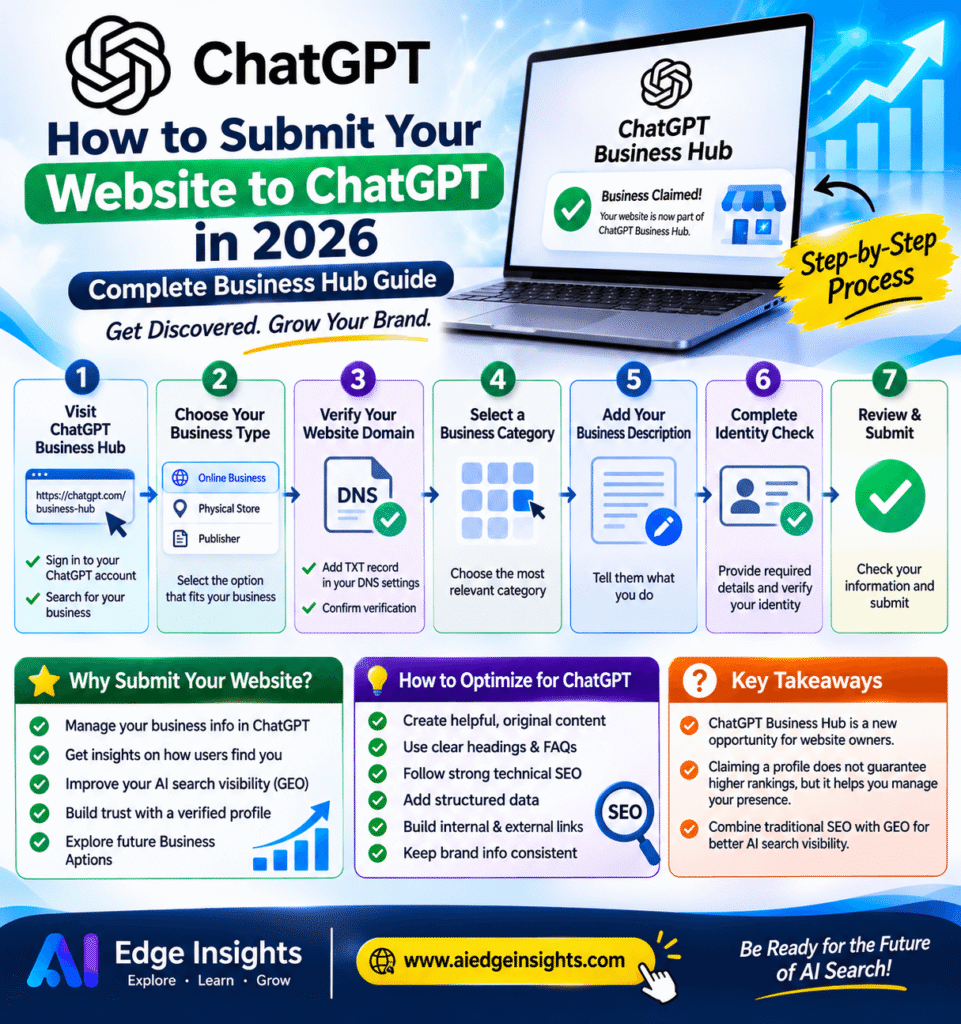
If you own a website or are authorized to represent a business, you can start by visiting the official Business Hub.
Step 1: Open ChatGPT Business Hub
Visit: https://chatgpt.com/business-hub
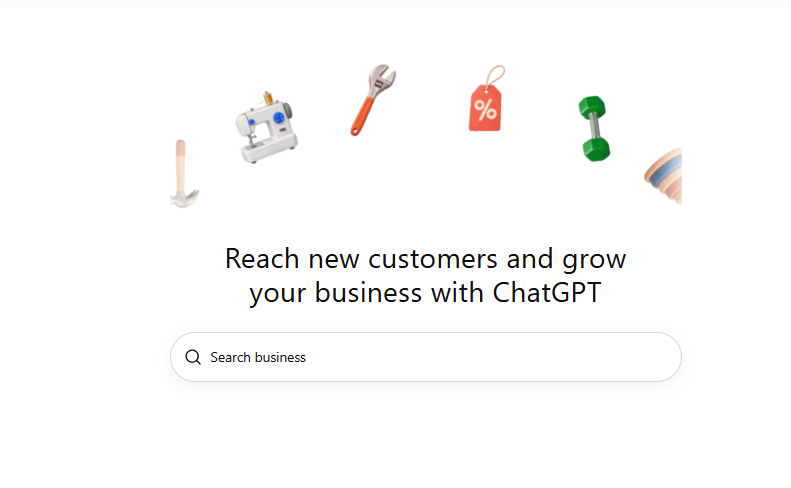
Sign in using your ChatGPT account.
Search for your business name to see whether an existing listing is available.
If your business does not appear, check whether the option to create a new profile is available.
Step 2: Choose Your Business Type
Depending on the available options, you may be asked how customers interact with your business.
For an online publication, website, or digital service, the website-based option may be the appropriate route.
Physical-location businesses may follow a different verification process.
Step 3: Verify Your Website Domain
Website verification is an important part of the claiming process.
In the domain verification flow, ChatGPT may provide a DNS TXT record that you need to add to your domain’s DNS settings.
For example, if your website is hosted through a provider such as Hostinger:
- Log in to your hosting account.
- Open your domain’s DNS management settings.
- Find the option to add a new DNS record.
- Select TXT as the record type.
- Enter the exact host/name and value provided by ChatGPT.
- Save the record.
- Return to Business Hub and complete the verification.
Make sure you copy the verification value exactly as provided.
DNS changes can take time to become publicly visible. Follow the instructions shown in Business Hub rather than assuming verification will happen immediately.
Step 4: Select a Business Category
After domain verification, you may be asked to choose a suitable business category.
Possible categories will depend on the options presented to you.
For example:
- Online media company
- Magazine publisher
- News service
- Ecommerce business
- Professional services
Choose the category that accurately describes your organization.
Step 5: Add Your Business Description
This is an important opportunity to explain what your business does.
Your description should be clear, specific, and written in natural language.
Include:
- Your official business name.
- Your industry or niche.
- Your main products or services.
- Your target audience.
- Your website’s purpose.
- Your key areas of expertise.
For example, an AI-focused publication could describe itself as:
“An independent AI news and technology publication covering artificial intelligence developments, generative AI tools, emerging technologies, industry research, AI tutorials, and global technology events. We provide news, analysis, practical guides, and insights for AI enthusiasts, professionals, developers, and businesses.”
Avoid keyword stuffing or making unsupported claims about your business.
Step 6: Complete Business and Identity Verification
Depending on your business type and location, OpenAI may request additional information.
This can include:
- Public business name.
- Legal business name.
- Business type.
- Country of registration.
- Business address.
- Registration or tax information, where required.
- Contact details.
- Personal identity verification through Persona.
Only submit accurate information that you are authorized to provide.
The exact requirements may vary depending on the business and verification route.
Step 7: Review and Submit Your Business Profile
Before completing the process, review all the information you have provided.
Check:
- Business name and website.
- Business description.
- Selected category.
- Contact information.
- Business details.
- Verification status.
Some profiles may initially be saved as drafts or remain under review.
Once your claim and identity verification are approved, you can access the available Business Hub management features.
Can You Submit a Website to ChatGPT From Outside the United States?
Yes, potentially.
This is an important distinction for international website owners.
According to OpenAI’s official announcement, eligible businesses located in countries where ChatGPT is available can claim their business through Business Hub.
However, eligibility depends on factors such as business location, industry, verification requirements, and supported claiming methods.
For website owners in countries such as Pakistan, Singapore, the United Kingdom, and other supported markets, availability should be checked directly through Business Hub.
There is also an important difference between claiming a business and creating a Business Agent.
Business Agents currently have separate eligibility requirements and are available to eligible ecommerce and online service businesses in the United States.
Therefore, international businesses should not assume that claiming a profile automatically provides access to every Business Hub feature.
How to Optimize Your Website for ChatGPT and AI Search
Claiming your business is only one part of building a strong AI search presence.
Your website should also provide useful, accessible, and clearly structured information.
Here are seven practical strategies.
1. Create Helpful, Original, and Authoritative Content
AI systems need understandable information to identify what your website covers.
Create detailed articles that answer real questions and provide meaningful insights.
For example, if your website covers artificial intelligence, publish content around:
- Latest AI news.
- AI tools and product comparisons.
- Generative AI tutorials.
- Industry developments.
- AI research and breakthroughs.
- Practical AI applications.
Developing a consistent publishing strategy can help establish topical relevance.
2. Use Clear Headings and Question-Based Content
Organize articles using descriptive H2 and H3 headings.
Include questions that match how people search for information.
For example:
- What is ChatGPT Business Hub?
- How do I submit my website to ChatGPT?
- Can international businesses claim a ChatGPT profile?
- Does claiming a business guarantee AI visibility?
Provide direct answers immediately after relevant headings.
This approach makes content easier for readers to scan and can improve its usefulness for answer-oriented search experiences.
3. Implement Proper Technical SEO
Make sure search engines can crawl and understand your website.
Important technical elements include:
- XML sitemap.
- Robots.txt configuration.
- Canonical URLs.
- Mobile-friendly design.
- HTTPS security.
- Fast page loading.
- Descriptive page titles.
- Proper meta descriptions.
- Logical heading hierarchy.
- Structured data where appropriate.
Use Google Search Console to monitor indexing and identify technical issues.
You can also test performance using Google PageSpeed Insights:
4. Add Relevant Structured Data
Structured data helps search engines understand specific information on your website.
Depending on your content, useful schema types may include:
- Organization
- Article
- NewsArticle
- Person
- BreadcrumbList
- Product
Use only schema that accurately describes visible page content.
Remember that structured data does not guarantee rich results or AI citations.
5. Strengthen Your Internal Linking Strategy
Internal links connect related articles and help visitors discover more information.
For example, an article about submitting a website to ChatGPT could link to:
- A beginner’s guide to using ChatGPT for content writing.
- ChatGPT commands and prompts.
- AI website development tutorials.
- AI tools and reviews.
Use descriptive anchor text instead of generic phrases such as “click here.”
A well-organized internal linking structure also helps communicate topical relationships across your website.
6. Build Credibility Through External Sources
Cite reliable sources when discussing product announcements, technical requirements, research, and industry developments.
Prioritize official documentation, original research, and reputable publications.
For example, when writing about ChatGPT Business Hub, link directly to OpenAI’s official announcement and Help Center.
You should also provide author information, editorial transparency, and clear references where appropriate.
7. Make Your Brand Information Consistent
Maintain consistent business information across your website and other public platforms.
This includes:
- Business name.
- Website URL.
- About page.
- Contact information.
- Author biographies.
- Social media profiles.
- Organization details.
Consistency helps readers and search systems understand which organization is associated with your website.
ChatGPT SEO vs GEO: What Is the Difference?
Traditional SEO and Generative Engine Optimization are related, but they are not identical.
SEO primarily focuses on improving visibility in traditional search engine results.
GEO focuses on making information and brands more understandable, relevant, and discoverable in generative AI experiences.
| Traditional SEO | GEO |
|---|---|
| Search engine rankings | AI-generated answer visibility |
| Organic search traffic | AI-referred discovery |
| Keyword optimization | Context and topical relevance |
| Backlinks and authority | Credibility and reliable references |
| Search snippets | Potential AI citations and mentions |
| Search engine crawling | AI system accessibility and retrieval |
The best strategy is not to abandon SEO for GEO.
Instead, build a website that provides useful information, has a strong technical foundation, and communicates expertise clearly.
Does Submitting Your Website to ChatGPT Guarantee Higher Rankings?
No.
Submitting or claiming a business through ChatGPT Business Hub does not guarantee higher placement in AI-generated responses, increased website traffic, or additional customers.
ChatGPT makes its own recommendations and comparisons.
Your website’s content quality, relevance, credibility, technical accessibility, and the context of individual user queries remain important considerations.
Business Hub should be viewed as an additional business information and measurement opportunity, not a shortcut to AI search rankings.
Frequently Asked Questions (FAQs)
1. How do I submit my website to ChatGPT?
Visit https://chatgpt.com/business-hub, sign in, search for your business, and follow the available claiming and verification instructions. You may be asked to verify your website domain and provide business information.
2. Is ChatGPT Business Hub free?
OpenAI’s Business Hub announcement describes the business claiming and information-management experience. Check the current official terms and your account’s available options for any applicable charges or separate paid services.
3. Can I submit my website to ChatGPT from Pakistan?
Potentially, yes. OpenAI says eligible businesses in locations where ChatGPT is available can claim their profiles. Actual availability depends on business eligibility and supported verification methods.
4. Does ChatGPT Business Hub work like Google Business Profile?
There are similarities because both allow businesses to manage information. However, they are different platforms with different eligibility rules, features, and discovery systems.
5. Does claiming a business improve ChatGPT rankings?
No guaranteed ranking improvement is promised. Claiming allows eligible businesses to manage their information and access insights, but ChatGPT independently determines its recommendations.
6. Can online-only businesses submit their websites?
Eligible online businesses can claim a profile through the website-based process. The availability of this option depends on the business and its eligibility.
7. What is the difference between Business Hub and Business Agents?
Business Hub allows businesses to claim and manage their profiles and access insights. Business Agents provide a separate AI-powered customer interaction experience and have additional eligibility requirements.
8. How can I improve my website’s visibility in ChatGPT?
Publish useful original content, maintain strong technical SEO, provide clear business information, establish topical authority, and make your website accessible to search and AI systems. No single optimization technique guarantees citations or recommendations.
Final Thoughts
The introduction of ChatGPT Business Hub represents another important development in the relationship between businesses and AI-powered discovery.
For website owners, publishers, and digital marketers, the opportunity is not simply about submitting a website. It is about making business information accurate, building a recognizable online presence, and creating content that genuinely answers users’ questions.
Traditional SEO remains important, but businesses should also start paying attention to Generative Engine Optimization and AI search visibility.
If you operate a website, check whether your business is eligible for Business Hub and make sure your online information is accurate and consistent.
The future of digital discovery will involve multiple platforms, and businesses that invest in useful content, credibility, and discoverability will be better prepared for that change.
Start here: https://chatgpt.com/business-hub
