
Artificial intelligence is changing how people work. Tasks that once required hours of research, writing, and manual effort can now be completed with help from AI tools.
The best AI agents in 2026 can help users research topics, analyze documents, manage repetitive tasks, connect applications, and complete multi step workflows. They are useful for freelancers, content creators, developers, marketers, and businesses looking to improve productivity.
However, choosing the right tool can be confusing. Some AI agents are designed for everyday tasks, while others focus on coding, research, customer service, or business automation.
In this guide, we explore the best AI agents in 2026, including their practical uses, free and paid options, benefits, and limitations.
What Is an AI Agent?
An AI agent is a software system that works toward a goal by performing multiple steps and using available tools. Depending on its capabilities, it may search the web, analyze files, interact with applications, or follow a defined workflow.
For example, a traditional chatbot can help you write an email. An AI agent may be able to prepare the email, retrieve relevant information from connected sources, and organize the next steps.
However, not every AI assistant is a fully autonomous agent. Some tools require users to approve actions or complete certain steps manually.
Best AI Agents in 2026: Quick Comparison
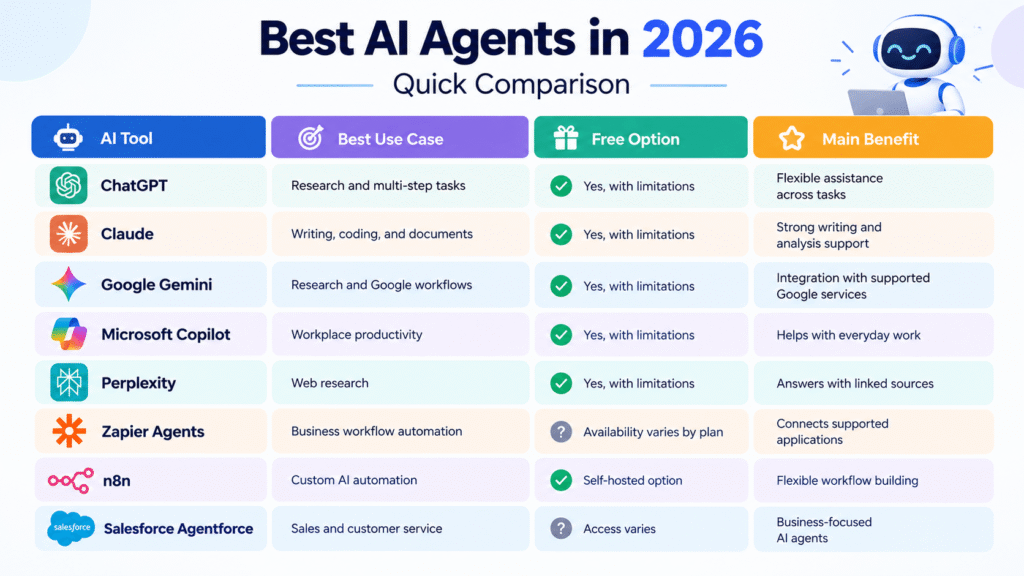
| AI Tool | Best Use Case | Free Option | Main Benefit |
|---|---|---|---|
| ChatGPT | Research and multi-step tasks | Yes, with limitations | Flexible assistance across tasks |
| Claude | Writing, coding, and documents | Yes, with limitations | Strong writing and analysis support |
| Google Gemini | Research and Google workflows | Yes, with limitations | Integration with supported Google services |
| Microsoft Copilot | Workplace productivity | Yes, with limitations | Helps with everyday work |
| Perplexity | Web research | Yes, with limitations | Answers with linked sources |
| Zapier Agents | Business workflow automation | Availability varies by plan | Connects supported applications |
| n8n | Custom AI automation | Self-hosted option | Flexible workflow building |
| Salesforce Agentforce | Sales and customer service | Access varies | Business-focused AI agents |
Note: Features, regional availability, usage limits, and pricing vary by product and subscription. Check the official websites for current details.
1. ChatGPT Agent: Best for General Work Automation
ChatGPT is a flexible AI assistant for research, writing, analysis, and problem-solving. Its agent capabilities can support more complex tasks by using available tools and interacting with supported websites, files, and applications.
Practical use cases
- Research a topic and prepare a report.
- Analyze spreadsheets and summarize findings.
- Organize information for marketing campaigns.
- Collect information from supported websites.
- Prepare structured content briefs and project plans.
For example, a content creator can use ChatGPT to research a technology topic, organize the findings, and prepare an article outline before editing the final draft.
If you want to explore the development of advanced AI models, read our related article: OpenAI Launches GPT-6 Astra: The Most Advanced AI Model Yet.
Free vs. paid: ChatGPT offers free access, while access to advanced agent capabilities depends on the eligible plan and current usage limits.
Limitations: AI-generated information can be incorrect, and website interactions may fail. Review important findings before using them in business decisions or publishing content.
Best for: Professionals who need help with different types of work in one place.
2. Claude: Best for Writing, Coding, and Document Analysis
Claude, developed by Anthropic, is useful for writing, coding, analyzing documents, and working through complex instructions. It can help users organize large amounts of information and improve the clarity of their work.
Practical use cases
- Draft and edit blog articles.
- Summarize lengthy reports.
- Review code and identify possible errors.
- Prepare research outlines.
- Improve business documents.
Developers can also explore Claude’s coding tools and supported agent workflows for software development tasks.
For more information about Anthropic’s AI models, read our guide to Claude Fable 5.1 and Mythos 5.1: The Next Era of AI Coding Agents.
Free vs. paid: Claude has a free tier in supported regions, while paid subscriptions offer additional usage or features depending on the plan.
Limitations: Claude can make factual mistakes, and external integrations depend on available features and permissions.
Best for: Writers, developers, researchers, and professionals who regularly work with documents.
3. Google Gemini: Best for Google-Based Workflows
Google Gemini helps users research information, draft content, summarize documents, and organize ideas. Its integration with supported Google services can make it particularly useful for people who already use Google’s productivity tools.
Practical use cases
- Draft emails and marketing content.
- Summarize documents and meeting notes.
- Brainstorm social media ideas.
- Organize research.
- Assist with supported Google Workspace tasks.
For example, a small business owner could use Gemini to prepare email drafts, summarize notes, and plan a marketing campaign.
Read our related article, Gemini 4 Argon: Google’s New AI Model for Complex Work, to explore another AI model topic covered by AI Edge Insights.
Free vs. paid: Gemini offers free and paid options. Advanced models, higher usage limits, and certain integrations may require a subscription.
Limitations: Features depend on the account, region, subscription, and connected services. Not every Gemini feature works as an independent agent.
Best for: Students, marketers, and professionals who use Google services.
4. Microsoft Copilot: Best for Workplace Productivity
Microsoft Copilot helps users write, summarize, research, and organize everyday work. Depending on the product and license, it can also assist within supported Microsoft 365 applications.
Practical use cases
- Draft business emails and documents.
- Summarize meetings and discussions.
- Help prepare presentations.
- Analyze spreadsheet information.
- Support project planning.
For example, a sales team could use supported Copilot features to summarize a meeting and prepare follow-up emails.
Free vs. paid: Microsoft offers free Copilot experiences and paid products. Advanced features within Microsoft 365 applications may require an eligible license.
Limitations: Some features require additional subscriptions or organizational permissions. Users should verify important information, especially in financial documents and reports.
Best for: Office workers and businesses using Microsoft products.
Official website: Microsoft Copilot.
5. Perplexity: Best for Web Research
Perplexity is an AI-powered research tool that helps users find information and explore topics through answers with linked sources.
It is particularly helpful when you need to understand an unfamiliar subject before writing an article or making a decision.
Practical use cases
- Research AI industry developments.
- Find official announcements and reports.
- Compare products and services.
- Identify sources for blog articles.
- Prepare research summaries.
For example, a technology publisher can use Perplexity to discover relevant reports and official announcements before writing an article.
Free vs. paid: Perplexity offers free access and paid plans with different usage limits and features.
Limitations: Citations do not guarantee accuracy. Always open original sources, check publication dates, and verify important claims.
Best for: Journalists, content creators, students, and researchers.
Official website: Perplexity AI.
6. Zapier Agents: Best for Business Automation
Zapier connects supported applications and automates workflows between them. Its AI agent features can help businesses add AI-powered decisions and actions to these workflows.
Practical use cases
- Organize incoming customer inquiries.
- Send lead information to a CRM.
- Create tasks from form submissions.
- Categorize support requests.
- Connect marketing and productivity applications.
For example, a business could build a workflow that receives a customer inquiry, categorizes it, and sends the details to the appropriate application.
Free vs. paid: Availability and usage limits depend on Zapier’s current plans and the specific AI features being used.
Limitations: Workflows depend on supported integrations and accurate input data. High usage or complex automation may increase costs.
Best for: Small businesses, marketers, and teams that want to automate repetitive work without building a custom application.
Official website: Zapier Agents.
7. n8n: Best for Custom AI Workflows
n8n is a workflow automation platform that connects applications, APIs, and AI services. It allows users to build customized processes with defined steps and AI-powered actions.
Practical use cases
- Prepare research summaries.
- Connect AI tools to spreadsheets and databases.
- Create scheduled reports.
- Build AI-assisted customer support workflows.
- Automate parts of a content production process.
For example, a publisher could create a workflow that collects information from selected sources, prepares an article draft, and sends it for editorial review.
Free vs. paid: n8n offers a self-hosted Community Edition, subject to its license, as well as paid hosted plans. Self-hosting requires suitable infrastructure and maintenance.
Limitations: Initial setup can be challenging for beginners. Users must manage credentials, integrations, security, and workflow errors.
Best for: Technical users, developers, and businesses that need flexible automation.
Official website: n8n AI Automation.
8. Salesforce Agentforce: Best for Business Processes
Salesforce Agentforce is designed for businesses that want to use AI agents in customer service, sales, and other business processes within the Salesforce ecosystem.
Practical use cases
- Assist with customer service requests.
- Help sales teams research leads.
- Support customer information workflows.
- Route inquiries to the right team.
- Assist employees with approved internal processes.
Free vs. paid: Pricing and access depend on the product, usage model, and Salesforce agreement. Check the official website for current options.
Limitations: Implementation may require planning, integrations, and appropriate data permissions. Businesses need clear rules for handling sensitive information and escalating complex requests.
Best for: Organizations already using Salesforce.
Official website: Salesforce Agentforce.
How to Choose the Best AI Agent for Your Needs
The best AI agent depends on the work you want to automate.
| Your Goal | Suggested Tool |
|---|---|
| Research and multi-step tasks | ChatGPT |
| Writing and document analysis | Claude |
| Google-based productivity | Gemini |
| Office productivity | Microsoft Copilot |
| Research with linked sources | Perplexity |
| Connecting business applications | Zapier Agents |
| Custom automation workflows | n8n |
| Salesforce business processes | Agentforce |
When comparing tools, consider the total cost, ease of use, privacy settings, integration options, and the amount of human review required.
If you are exploring AI models for complex tasks, you may also find our article on Meta Muse, Wonder, and Wonder Full: New AI Models Built for Complex Tasks useful.
Benefits and Limitations of AI Agents
AI agents can reduce repetitive work, organize information, and help teams complete tasks more efficiently. They may also help small businesses handle more work without immediately expanding their teams.
However, AI agents are not always accurate. They can misunderstand instructions, use outdated information, or fail when a website or integration changes.
For better results, start with simple, low-risk tasks. Test the workflow, check the output, and measure the time saved before expanding automation.
Never give an AI agent unnecessary access to sensitive information. Require human approval before important actions, such as publishing content, sending sensitive messages, spending money, or changing business records.

Frequently Asked Questions
What are the best AI agents in 2026?
ChatGPT, Claude, Gemini, Microsoft Copilot, Perplexity, Zapier Agents, n8n, and Salesforce Agentforce are useful options. Each serves different needs, from research and writing to custom automation and business processes.
Which AI agent is best for beginners?
ChatGPT, Claude, and Gemini are practical starting points for everyday tasks. Workflow tools such as n8n may require more setup and technical knowledge.
Are there free AI agents in 2026?
Yes. Several AI assistants offer free tiers, and n8n provides a self-hosted Community Edition. Free options may have usage limits and may not include every advanced agent feature.
Can AI agents automate a business?
Yes. Depending on their capabilities and integrations, AI agents can assist with customer inquiries, research, lead management, reporting, and repetitive administrative tasks. Important decisions should remain under suitable human supervision.
Can AI agents automatically publish website articles?
Some agents and automation workflows can prepare and publish articles through supported integrations. However, human review is recommended to check facts, source quality, originality, and readability before publication.
Final Thoughts
The best AI agents in 2026 are the tools that solve real problems and fit your budget, skills, and existing workflow.
Choose ChatGPT for flexible assistance, Claude for writing and document analysis, Gemini for supported Google workflows, or Perplexity for research. For more advanced automation, consider Zapier Agents or n8n. Businesses using Salesforce may benefit from Agentforce.
Start with one repetitive task, test the results, and expand only when the process proves reliable. AI agents can save time, but human judgment remains essential for accuracy, privacy, and quality.
Editorial note: Verify product features, availability, and pricing on official websites before publication, as these details may change.
